
Address Unit Confirmation
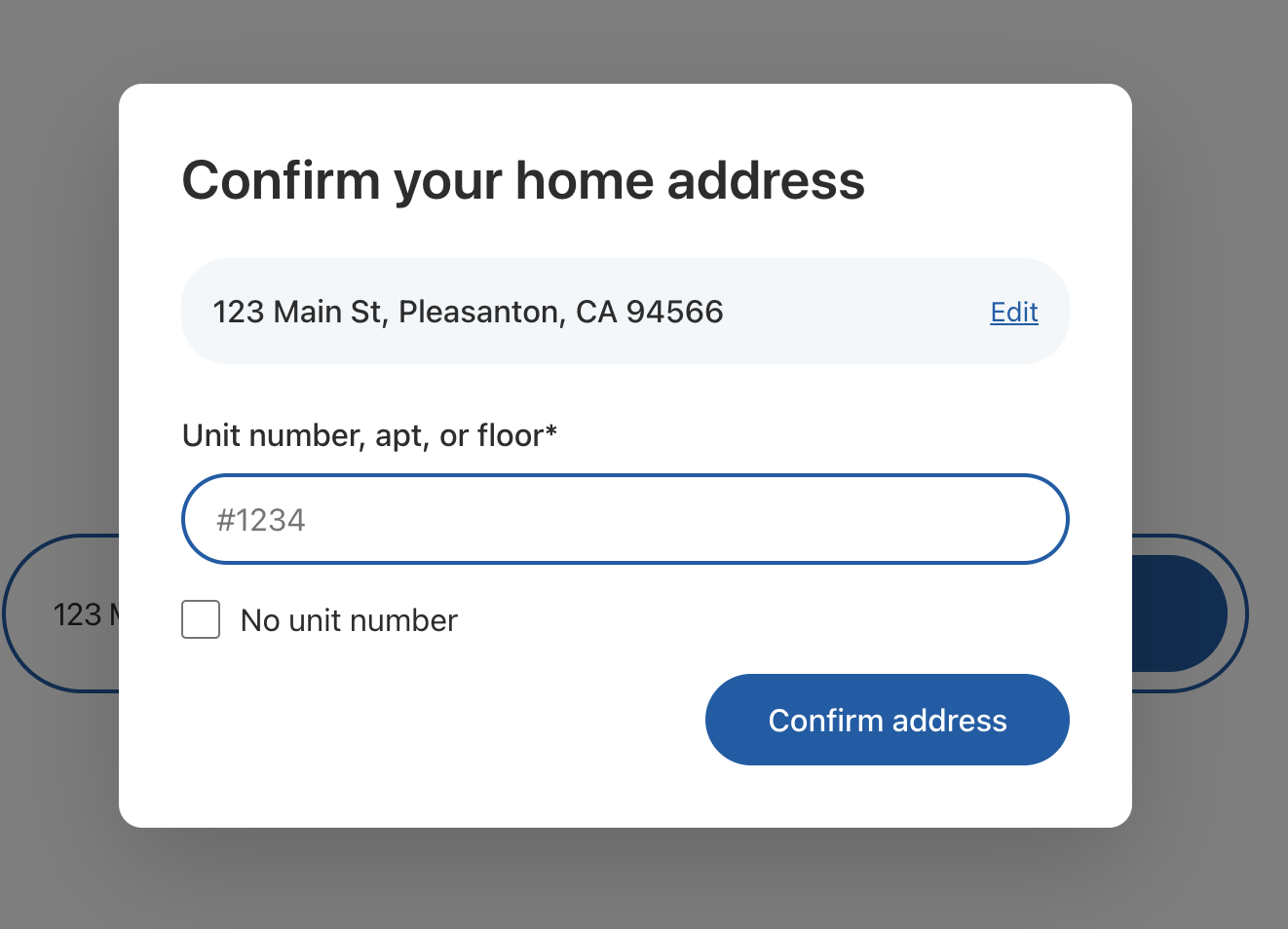
The AddressUnitConfirmation component collects a unit, apartment, or floor number when the selected address needs one. It renders as content only - you control how to display it (modal, separate page, inline section).
When to show it
After the user selects an address, call client.checkAddressUnit(address) to determine if the address needs a unit number. If requiresUnitNumber is true, show this component before creating the offer.
flowchart LR
    A["AddressEntry"] --> B{"checkAddressUnit()"}
    B -->|needs unit| C["AddressUnitConfirmation"]
    C --> D["createOffer()"]
    B -->|no unit needed| D
Integration flow
import { useState } from 'react';import {  OpendoorProvider,  AddressEntry,  AddressUnitConfirmation,  QualificationQuestions,} from '@opendoor/partner-sdk-client-react';import { OpendoorClient } from '@opendoor/partner-sdk-client-js-core';import type { Address } from '@opendoor/partner-sdk-client-js-core';
const client = new OpendoorClient({ baseURL: '/api/opendoor/v1' });
function App() {  const [address, setAddress] = useState<Address | null>(null);  const [needsUnit, setNeedsUnit] = useState(false);  const [offerId, setOfferId] = useState<string | null>(null);
  const handleAddressSelect = async (addr: Address) => {    setAddress(addr);
    // Check if the address needs a unit number    const { requiresUnitNumber } = await client.checkAddressUnit(addr);
    if (requiresUnitNumber) {      setNeedsUnit(true);    } else {      const offer = await client.createOffer({ address: addr });      setOfferId(offer.opendoorOfferRequestId);    }  };
  const handleUnitConfirm = async (confirmedAddress: Address) => {    setNeedsUnit(false);    setAddress(confirmedAddress);    const offer = await client.createOffer({ address: confirmedAddress });    setOfferId(offer.opendoorOfferRequestId);  };
return ( <OpendoorProvider client={client}> {offerId && address ? ( <QualificationQuestions offerId={offerId} address={address} /> ) : ( <> <AddressEntry onAddressSelect={handleAddressSelect} /> {needsUnit && address && ( <div className="modal-overlay"> <AddressUnitConfirmation address={address} onConfirm={handleUnitConfirm} onEdit={() => { setNeedsUnit(false); setAddress(null); }} /> </div> )} </> )} </OpendoorProvider> );}<script setup lang="ts">import { ref } from 'vue';import { OpendoorProvider, AddressEntry, AddressUnitConfirmation, OpendoorClient,} from '@opendoor/partner-sdk-client-vue';import '@opendoor/partner-sdk-client-vue/dist/style.css';import type { Address } from '@opendoor/partner-sdk-client-js-core';
const client = new OpendoorClient({ baseURL: '/api/opendoor/v1' });
const address = ref<Address | null>(null);const needsUnit = ref(false);const offerId = ref<string | null>(null);
const handleAddressSelect = async (addr: Address) => { address.value = addr;
// Check if the address needs a unit number const { requiresUnitNumber } = await client.checkAddressUnit(addr);
if (requiresUnitNumber) { needsUnit.value = true; } else { const offer = await client.createOffer({ address: addr }); offerId.value = offer.opendoorOfferRequestId; }};
const handleUnitConfirm = async (confirmedAddress: Address) => { needsUnit.value = false; address.value = confirmedAddress; const offer = await client.createOffer({ address: confirmedAddress }); offerId.value = offer.opendoorOfferRequestId;};
const handleEdit = () => { needsUnit.value = false; address.value = null;};</script>
<template> <OpendoorProvider :client="client"> <AddressEntry @address-select="handleAddressSelect" /> <div v-if="needsUnit && address" class="modal-overlay"> <AddressUnitConfirmation :address="address" @confirm="handleUnitConfirm" @edit="handleEdit" /> </div> </OpendoorProvider></template>Backend setup
Your BFF server needs a route for the unit check. The server SDK calls the GraphQL addressUnitCheck query.
app.post('/api/opendoor/v1/address/unit-check', async (req, res) => { const result = await opendoor.checkAddressUnit(req.body); res.json(result);});Props
| Prop | Type | Default | Description |
|---|---|---|---|
address | Address | Required | The address that needs unit confirmation |
appearance | OpendoorAppearance | { theme: 'default' } | Visual theme configuration (matches AddressEntry default) |
onConfirm | (address: Address) => void | Required | Called when user confirms - address includes street2 (unit) or not if “No unit number” |
onEdit | () => void | - | Called when user clicks “Edit” on the address card |
onReady | () => void | - | Called when the component mounts |
onError | (error: Error) => void | - | Called on validation errors |
In Vue, props use kebab-case in templates. Callbacks become emits — see the events table below.
| Prop | Type | Default | Description |
|---|---|---|---|
address | Address | Required | The address that needs unit confirmation |
appearance | OpendoorAppearance | { theme: 'default' } | Visual theme configuration (matches AddressEntry default) |
Callbacks & Events
| Callback | Type | When it fires |
|---|---|---|
onConfirm | (address: Address) => void | User confirms — address includes street2 (unit) or not if “No unit number” |
onEdit | () => void | User clicks “Edit” on the address card |
onReady | () => void | Component mounts |
onError | (error: Error) => void | Validation errors |
In Vue, callbacks are emitted as kebab-case events instead of onCamelCase callback props:
| Vue emit | Payload | When it fires |
|---|---|---|
@confirm | Address | User confirms — address includes street2 (unit) or not if “No unit number” |
@edit | — | User clicks “Edit” on the address card |
@ready | — | Component mounts |
@error | Error | Validation errors |
UI elements
The component renders:
- Title: “Confirm your home address”
- Address card: Displays the selected address with an “Edit” link
- Unit input: Text field labeled “Unit number, apt, or floor*” with placeholder “#1234”
- “No unit number” checkbox: Skips the unit input when checked
- “Confirm address” button: Submits the unit or confirms no unit is needed
Display options
Since the component is content-only, you can display it however you want:
As a modal dialog
<dialog open={needsUnit}> <AddressUnitConfirmation address={address} onConfirm={handleConfirm} /></dialog><dialog :open="needsUnit"> <AddressUnitConfirmation :address="address" @confirm="handleConfirm" /></dialog>As a separate page/step
{ step === 'unit' && ( <AddressUnitConfirmation address={address} onConfirm={handleConfirm} /> );}<AddressUnitConfirmation v-if="step === 'unit'" :address="address" @confirm="handleConfirm"/>Inline below the address input
<AddressEntry onAddressSelect={handleAddressSelect} />;{ needsUnit && ( <AddressUnitConfirmation address={address} onConfirm={handleConfirm} /> );}<AddressEntry @address-select="handleAddressSelect" /><AddressUnitConfirmation v-if="needsUnit" :address="address" @confirm="handleConfirm"/>Styling
The component uses the appearance prop for theming, defaulting to the default theme (same as AddressEntry). See the Styling & Themes guide for all available tokens.
Behavior
- Validation: If neither a unit number is entered nor “No unit number” is checked, clicking “Confirm address” shows an error
- “No unit number”: When checked, the unit input is disabled and cleared.
onConfirmfires with the original address (nostreet2) - Unit entered:
onConfirmfires with the address plusstreet2set to the unit value - “Edit”: Fires
onEdit- the partner navigates back to address entry