
DTC Onboarding Flow
The DtcOnboardingFlow component renders the traditional (non-instant-offer) questionnaire, matching the DTC flow on opendoor.com. It presents 17 pages of questions — one per screen — with a two-column layout on desktop and stacked layout on mobile. It handles navigation, validation, conditional page skipping, and fires onSubmit when the user completes the flow.
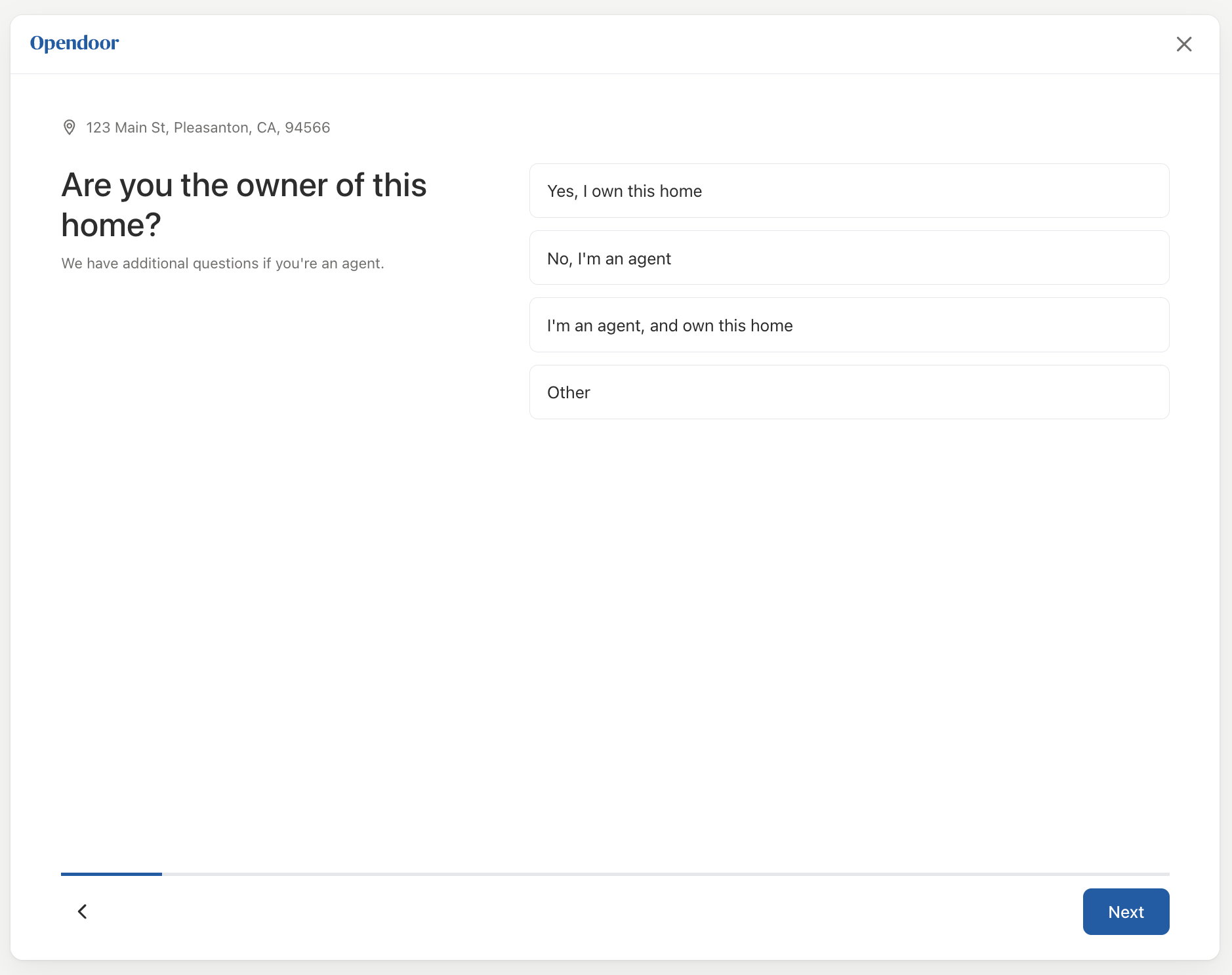
Basic usage
import { useState } from 'react';import {  DtcOnboardingFlow,  OpendoorProvider,} from '@opendoor/partner-sdk-client-react';import { OpendoorClient } from '@opendoor/partner-sdk-client-js-core';import type { Address } from '@opendoor/partner-sdk-client-js-core';
const client = new OpendoorClient({ baseURL: '/api/opendoor/v1' });
function App({ address }: { address: Address }) {  const [offerId, setOfferId] = useState<string | null>(null);
  // Step 1: Create the offer request BEFORE showing the questionnaire  const startFlow = async () => {    const offer = await client.createOffer({ address });    if (offer.offerStatus === 'DENIED') {      console.log('Denied:', offer.denialInfo?.explanation);      return;    }    setOfferId(offer.opendoorOfferRequestId);  };
  if (!offerId) {    return <button onClick={startFlow}>Get an Offer</button>;  }
  // Step 2: Submit answers via updateOffer when the questionnaire completes  const handleSubmit = async (answers: Record<string, unknown>) => {    await client.updateOffer(offerId, answers);    // Step 3: Poll client.getOffer(offerId) until status is OFFERED or DENIED  };
return ( <OpendoorProvider client={client}> <DtcOnboardingFlow address={address} appearance={{ theme: 'minimal' }} partnerLogoUrl="/your-logo.svg" onSubmit={handleSubmit} onClose={() => console.log('User closed the flow')} /> </OpendoorProvider> );}<script setup lang="ts">import { ref } from 'vue';import { DtcOnboardingFlow, OpendoorClient, OpendoorProvider,} from '@opendoor/partner-sdk-client-vue';import '@opendoor/partner-sdk-client-vue/dist/style.css';import type { Address } from '@opendoor/partner-sdk-client-js-core';
const props = defineProps<{ address: Address }>();const client = new OpendoorClient({ baseURL: '/api/opendoor/v1' });const offerId = ref<string | null>(null);
// Step 1: Create the offer request BEFORE showing the questionnaireasync function startFlow() { const offer = await client.createOffer({ address: props.address }); if (offer.offerStatus === 'DENIED') { console.log('Denied:', offer.denialInfo?.explanation); return; } offerId.value = offer.opendoorOfferRequestId;}
// Step 2: Submit answers via updateOfferconst handleSubmit = async (answers: Record<string, unknown>) => { if (!offerId.value) return; await client.updateOffer(offerId.value, answers); // Step 3: Poll client.getOffer(offerId) until status is OFFERED};
const handleClose = () => console.log('User closed the flow');</script>
<template> <button v-if="!offerId" @click="startFlow">Get an Offer</button> <OpendoorProvider v-else :client="client"> <DtcOnboardingFlow :address="address" :appearance="{ theme: 'minimal' }" partner-logo-url="/your-logo.svg" :on-close="handleClose" @submit="handleSubmit" /> </OpendoorProvider></template>Wrap the component in <OpendoorProvider> to supply the SDK client.
Required BFF endpoints
| Route | Backing server SDK call |
|---|---|
POST /api/opendoor/v1/offer/create | opendoor.createOffer(...) |
POST /api/opendoor/v1/offer/update | opendoor.updateOffer(offerId, ...) |
POST /api/opendoor/v1/offer | opendoor.getOffer(offerId) |
POST /api/opendoor/v1/homebuilders | opendoor.getHomebuilders() |
See Quick Start step 1 for complete Node (Express) and Ruby (Rails) backend examples.
Props
| Prop | Type | Default | Description |
|---|---|---|---|
address | Address | Required | The selected property address |
onSubmit | (answers) => void | Required | Called when user completes all pages |
partnerLogoUrl | string | - | Partner logo URL (shown before the Opendoor logo in header) |
appearance | OpendoorAppearance | { theme: 'minimal' } | Visual theme configuration |
initialAnswers | Record<string, AnswerValue> | - | Prefill data (e.g., from address lookup) |
skipPages | readonly DtcOnboardingPageId[] | - | Page IDs to remove from the flow entirely (below) |
checkForAgent | boolean | false | When true, owners see a listing-agent page (name + email) at the end of the questions, before their own contact info. Next continues with both blank; filling either requires both |
submitLabel | string | 'See my offer' | Overrides the contact-info page CTA + consent disclaimer (below) |
contactPageTitle | string | - | Overrides the contact-info page title (below) |
contactPageSubtitle | string | - | Overrides the contact-info page subtitle (below) |
smsConsentText | ReactNode | - | Custom SMS opt-in toggle label on the contact page (below) |
contactConsentText | ReactNode | - | Custom legal disclaimer below the submit button on the contact page (below) |
onClose | () => void | - | Called when close (X) button is clicked |
In Vue, props use kebab-case in templates (e.g., partner-logo-url, initial-answers). The onClose handler is passed as a prop (:on-close="fn"), not an emit. Callbacks that are emits use @event-name syntax — see the events table below.
| Prop | Type | Default | Description |
|---|---|---|---|
address | Address | Required | The selected property address |
partner-logo-url | string | - | Partner logo URL (shown before the Opendoor logo in header) |
appearance | OpendoorAppearance | { theme: 'minimal' } | Visual theme configuration |
initial-answers | Record<string, AnswerValue> | - | Prefill data (e.g., from address lookup) |
skip-pages | readonly DtcOnboardingPageId[] | - | Page IDs to remove from the flow entirely (below) |
check-for-agent | boolean | false | When true, owners see a listing-agent page (name + email) at the end of the questions, before their own contact info. Next continues with both blank; filling either requires both |
submit-label | string | 'See my offer' | Overrides the contact-info page CTA + consent disclaimer (below) |
contact-page-title | string | - | Overrides the contact-info page title (below) |
contact-page-subtitle | string | - | Overrides the contact-info page subtitle (below) |
:on-close | () => void | - | Called when close (X) button is clicked (prop, not emit) |
Slots:
| Slot | Description |
|---|---|
#sms-consent-text | Custom SMS opt-in toggle label on the contact page (below) |
#contact-consent-text | Custom legal disclaimer below the submit button on the contact page (below) |
Callbacks & Events
| Callback | Type | When it fires |
|---|---|---|
onReady | () => void | Component mounted and ready |
onSubmit | (answers) => void | User completed all pages |
onPageChange | (pageIndex, pageId) => void | User navigates between pages |
onAnswerChange | (key, value) => void | Any answer changes |
onError | (error: Error) => void | Validation or internal error |
onClose | () => void | Close button clicked |
In Vue, callbacks are emitted as kebab-case events instead of onCamelCase callback props:
| Vue emit | Payload | When it fires |
|---|---|---|
@submit | Record<string, unknown> | User completed all pages |
@ready | — | Component mounted and ready |
@page-change | pageIndex, pageId | User navigates between pages |
@answer-change | key, value | Any answer changes |
@error | Error | Validation or internal error |
onClose is a prop in Vue (:on-close="fn"), not an emit, because it controls the close button behavior.
Pages
The component renders 17 pages. Pages with conditional visibility are automatically skipped when their conditions are not met (e.g., HOA sub-pages are skipped when HOA = No).
| # | Page | What it collects |
|---|---|---|
| 1 | Confirm Home Details | Dwelling type, beds, baths, sqft, stories, basement, year, pool |
| 2 | Ownership | Relationship to owner (owner, agent, other) |
| 3 | Sale Timeline | When the user needs to sell |
| 4-7 | Room Condition (×4) | Kitchen, bathroom, living room, exterior — 5-level image select |
| 8 | HOA | Is the home part of an HOA? |
| 9 | HOA Type | Age-restricted, gated community (if HOA = Yes) |
| 10 | HOA Guard | Guard at entrance (if gated community) |
| 11 | HOA Fees | Monthly fees (if HOA = Yes, optional) |
| 12 | Eligibility Criteria | Disqualifying property features (solar, foundation, etc.) |
| 13 | Upgrades | Has the home had upgrades? |
| 14 | Homebuilder | Working with a homebuilder? |
| 15 | Homebuilder Name | Which homebuilder (if yes) |
| 16 | Homebuilder Details | Sales associate email + community name (if yes) |
| 17 | Contact Info | Name, email, phone, SMS consent |
Conditional logic
The component asks more than just the HOA and homebuilder follow-ups conditionally. If you’re building your own UI against the partner GraphQL API (offerRequestUpdate) rather than using <DtcOnboardingFlow>, this is the full list of fields you should gate on a prior answer.
Conditional follow-up questions
Pages/questions that only appear when a parent answer warrants them:
| Field | Only ask when |
|---|---|
homeHoaTypeAgeRestrictedCommunity | homeHoa === true |
homeHoaTypeGatedCommunity | homeHoa === true |
homeHoaFees | homeHoa === true |
homeHoaTypeGuardedGatedCommunity | homeHoa === true AND homeHoaTypeGatedCommunity === true |
sellerHomeBuilder | sellerWorkingWithHomeBuilder === true |
sellerHomeBuilderEmail | sellerWorkingWithHomeBuilder === true |
sellerHomeBuilderCommunity | sellerWorkingWithHomeBuilder === true |
sellerRelationToOwnerOther | sellerRelationToOwner === 'other' |
Conditional home-detail fields
Fields rendered on the home-details page that depend on a prior answer on the same page:
| Field | Only ask when |
|---|---|
homeHasBasement | homeDwellingType is not APARTMENT or MOBILE_HOME |
homeBasementFinishedSqFt, homeBasementUnfinishedSqFt | homeHasBasement === true |
homeGarageSpaces | homeCoveredParkingType is not NONE |
homeEntryType | homeDwellingType is APARTMENT or TOWNHOUSE |
What about market-based filtering?
There isn’t any. You can send any field for any market — the eligibility engine evaluates per-market. If you send an answer that isn’t relevant to a given market (e.g. basement data for a Florida market), it’s not rejected; it just doesn’t affect that market’s eligibility ruleset.
Skipping pages
Pass skipPages to remove pages from the questionnaire entirely — useful when the partner already knows the answers and the question shouldn’t be asked. Skipped pages are dropped from navigation; downstream showWhen conditions still resolve against any answers you pre-set via initialAnswers.
skipPages is for unconditional removal. Conditional pages (e.g. HOA sub-pages when HOA = No) are already hidden automatically.
Page IDs are exported as DTC_ONBOARDING_PAGE_IDS from @opendoor/partner-sdk-client-js-core — use them for compile-time safety:
| Page ID | Page |
|---|---|
confirm-home-details | Confirm Home Details |
ownership | Ownership |
sale-timeline | Sale Timeline |
kitchen-condition | Kitchen Condition |
bathroom-condition | Bathroom Condition |
living-room-condition | Living Room Condition |
exterior-condition | Exterior Condition |
hoa | HOA |
hoa-type | HOA Type |
hoa-guard | HOA Guard |
hoa-fees | HOA Fees |
eligibility-criteria | Eligibility Criteria |
upgrades | Upgrades |
homebuilder | Homebuilder |
homebuilder-name | Homebuilder Name |
homebuilder-details | Homebuilder Details |
listing-agent-contact | Listing Agent Contact (only in the flow when checkForAgent is set; shown when the seller owns the home, immediately before contact info) |
contact-info | Contact Info |
Example: skip the homebuilder branch
If the partner already knows the customer is buying from a specific homebuilder, skip the three homebuilder pages and pre-fill the answers via initialAnswers so they still make it into the submitted data:
<DtcOnboardingFlow address={address} skipPages={['homebuilder', 'homebuilder-name', 'homebuilder-details']} initialAnswers={{ 'seller.working_with_home_builder': 'true', 'seller.home_builder': 'lennar', }} onSubmit={handleSubmit}/><DtcOnboardingFlow :address="address" :skip-pages="['homebuilder', 'homebuilder-name', 'homebuilder-details']" :initial-answers="{ 'seller.working_with_home_builder': 'true', 'seller.home_builder': 'lennar', }" @submit="handleSubmit"/>Contact page copy overrides
The contact-info page defaults to offer-centric copy (title “You’re one step from your offer.”, CTA “See my offer.”). For partners whose flow doesn’t surface an offer immediately after the questionnaire — e.g. routing to in-home assessment scheduling instead — three props let you swap the page’s headline, subtitle, and submit-button label:
submitLabel— overrides the CTA. Updates both the visible button text and the legal-consent disclaimer that interpolates the label, so the accessibility tree stays in sync (screen readers will announce the override, not the default).contactPageTitle— overrides the page heading.contactPageSubtitle— overrides the supporting subtitle.
<DtcOnboardingFlow address={address} submitLabel="Submit" contactPageTitle="Schedule your in-home assessment" contactPageSubtitle="Share a few details and we'll book a time that works for you." onSubmit={handleSubmit}/><DtcOnboardingFlow :address="address" submit-label="Submit" contact-page-title="Schedule your in-home assessment" contact-page-subtitle="Share a few details and we'll book a time that works for you." @submit="handleSubmit"/>All three are optional — omit any of them to keep the default copy for that field. Passing an empty string is treated as an explicit override: an empty contactPageTitle renders an empty heading, and an empty contactPageSubtitle suppresses the subtitle entirely.
Consent language
The contact page (page 17) has two independently configurable consent strings:
smsConsentText/#sms-consent-text— the SMS marketing opt-in toggle label. Defaults to Opendoor’s standard SMS consent copy. Override to add your company name for co-consent. In React, pass aReactNodeprop; in Vue, use the#sms-consent-textslot.contactConsentText/#contact-consent-text— the legal disclaimer rendered below the “See my offer” button. Defaults to Opendoor’s Terms of Service and Privacy Policy disclaimer. In React, pass aReactNodeprop; in Vue, use the#contact-consent-textslot.
Customizing the SMS opt-in label
<DtcOnboardingFlow address={address} smsConsentText="I consent to receive marketing calls and texts from Opendoor and its affiliates to the number provided. I also agree to be contacted by Acme Co. I understand that I may opt out at any time and consent is not a condition of purchase." onSubmit={handleSubmit}/><DtcOnboardingFlow :address="address" @submit="handleSubmit"> <template #sms-consent-text> I consent to receive marketing calls and texts from Opendoor and its affiliates to the number provided. I also agree to be contacted by Acme Co. I understand that I may opt out at any time and consent is not a condition of purchase. </template></DtcOnboardingFlow>Customizing the legal disclaimer
<DtcOnboardingFlow address={address} contactConsentText={ <p> By clicking "See my offer," I agree to Acme Co.’s{‘ ‘} <a href="https://acme.co/terms">Terms of Service</a> and{‘ ‘} <a href="https://acme.co/privacy">Privacy Policy</a>. </p> } onSubmit={handleSubmit}/><DtcOnboardingFlow :address="address" @submit="handleSubmit"> <template #contact-consent-text> <p> By clicking "See my offer," I agree to Acme Co.’s <a href="https://acme.co/terms">Terms of Service</a> and <a href="https://acme.co/privacy">Privacy Policy</a>. </p> </template></DtcOnboardingFlow>Prefilling answers
Pass initialAnswers to pre-populate fields (e.g., from property data). For the full list of keys, config types, and allowed option values, see the field reference below.
<DtcOnboardingFlow address={address} initialAnswers={{ 'home.dwelling_type': 'single_family', 'home.bedrooms': 3, 'home.bathrooms.full': 2, 'home.above_grade_sq_ft': 1800, 'home.year_built': 2010, }} onSubmit={handleSubmit}/><DtcOnboardingFlow :address="address" :initial-answers="{ 'home.dwelling_type': 'single_family', 'home.bedrooms': 3, 'home.bathrooms.full': 2, 'home.above_grade_sq_ft': 1800, 'home.year_built': 2010, }" @submit="handleSubmit"/>Loading prefills from getHomeDetail
Call client.getHomeDetail({ opendoorOfferRequestId }) after createOffer to fetch prefills from MLS and public records. Pass the result as initialAnswers. See the field reference below for available keys.
async function startFlow(address: Address) {  const offer = await client.createOffer({ address });  const { answerPrefills } = await client.getHomeDetail({    opendoorOfferRequestId: offer.opendoorOfferRequestId,  });
  const initialAnswers = Object.fromEntries(    Object.entries(      answerPrefills as Record<string, { value: unknown }>    ).map(([key, entry]) => [key, entry.value])  );
// Render with the loaded prefills: // <OpendoorProvider client={client}> // <DtcOnboardingFlow // address={address} // initialAnswers={initialAnswers} // onSubmit={(answers) => client.updateOffer(offer.opendoorOfferRequestId, answers)} // /> // </OpendoorProvider>}<script setup lang="ts">import { ref } from 'vue';import { DtcOnboardingFlow, OpendoorClient, OpendoorProvider,} from '@opendoor/partner-sdk-client-vue';import '@opendoor/partner-sdk-client-vue/dist/style.css';import type { Address } from '@opendoor/partner-sdk-client-js-core';
const props = defineProps<{ address: Address }>();const client = new OpendoorClient({ baseURL: '/api/opendoor/v1' });const offerId = ref<string | null>(null);const initialAnswers = ref<Record<string, unknown>>({});
async function startFlow() { const offer = await client.createOffer({ address: props.address }); const { answerPrefills } = await client.getHomeDetail({ opendoorOfferRequestId: offer.opendoorOfferRequestId, }); initialAnswers.value = Object.fromEntries( Object.entries( answerPrefills as Record<string, { value: unknown }> ).map(([key, entry]) => [key, entry.value]) ); offerId.value = offer.opendoorOfferRequestId;}
const handleSubmit = (answers: Record<string, unknown>) => client.updateOffer(offerId.value!, answers);</script>
<template> <button v-if="!offerId" @click="startFlow">Get an Offer</button> <OpendoorProvider v-else :client="client"> <DtcOnboardingFlow :address="address" :initial-answers="initialAnswers" @submit="handleSubmit" /> </OpendoorProvider></template>Field reference
Use these dot-notation keys with initialAnswers on DtcOnboardingFlow (React) or :initial-answers (Vue). Shapes match what you pass to updateOffer. Aggregate type for values is AnswerValue: string | number | boolean | string[] | undefined (from @opendoor/partner-sdk-client-js-core/internal/questionnaire).
| Page | Key | Config type | Required | Allowed values / notes |
|---|---|---|---|---|
confirm-home-details | home.dwelling_type | string | yes | single_family, townhouse, apartment, mobile_home |
confirm-home-details | home.bedrooms | number | yes | 1, 2, 3, 4, 5, 6, 7, 8, 9, 10, 11, 12 |
confirm-home-details | home.bathrooms.full | number | yes | 1, 2, 3, 4, 5, 6, 7, 8, 9, 10 |
confirm-home-details | home.bathrooms.half | number | no | 0, 1, 2, 3, 4, 5, 6, 7, 8, 9, 10 |
confirm-home-details | home.exterior_stories | number | yes | 1, 2, 3 |
confirm-home-details | home.above_grade_sq_ft | number | yes | (no fixed enum) |
confirm-home-details | home.has_basement | string | yes | yes, no |
confirm-home-details | home.basement_finished_sq_ft | number | no | (no fixed enum) |
confirm-home-details | home.basement_unfinished_sq_ft | number | no | (no fixed enum) |
confirm-home-details | home.year_built | number | yes | 1877–2026 (150 values) |
confirm-home-details | home.pool_type | string | yes | in_ground, above_ground, community_pool, no_pool |
confirm-home-details | home.covered_parking_type | string | no | garage, carport, none |
confirm-home-details | home.garage_spaces | number | no | 0, 1, 2, 3, 4, 5 |
confirm-home-details | home.entry_type | string | yes | direct_entry, shared_entrance_condo |
ownership | seller.relation_to_owner | string | yes | self, agent, agent_and_owner, other |
ownership | seller.relation_to_owner.other | string | yes | (no fixed enum) |
sale-timeline | seller.sale_timeline | string | yes | ASAP, 2_TO_4_WEEKS, 4_TO_6_WEEKS, 6_PLUS_WEEKS, JUST_BROWSING |
kitchen-condition | home.kitchen_seller_score | string | yes | fixer_upper, dated, standard, high_end, luxury |
bathroom-condition | home.bathroom_seller_score | string | yes | fixer_upper, dated, standard, high_end, luxury |
living-room-condition | home.living_room_seller_score | string | yes | fixer_upper, dated, standard, high_end, luxury |
exterior-condition | home.exterior_seller_score | string | yes | fixer_upper, dated, standard, high_end, luxury |
hoa | home.hoa | string | yes | yes, no |
hoa-type | home.hoa_type | string[] | yes | age_restricted_community, gated_community, none |
hoa-guard | home.hoa_type.guarded_gated_community | string | yes | has_guard, no_guard |
hoa-fees | home.hoa_fees | number | no | (no fixed enum) |
eligibility-criteria | home.eligibility_criteria | string[] | no | leased_solar_panels, known_foundation_issues, fire_damage, well_water, septic, unique_ownership_structure, below_market_rate_ownership, rent_controlled_tenant_occupied, mobile_manufactured_home, none |
upgrades | home.has_upgrades | string | yes | yes, no |
homebuilder | seller.working_with_home_builder | string | yes | true, false |
homebuilder-name | seller.home_builder | string | no | (no fixed enum) |
homebuilder-details | seller.home_builder_email | string | no | (no fixed enum) |
homebuilder-details | seller.home_builder_community | string | no | (no fixed enum) |
contact-info | seller.full_name | string | yes | (no fixed enum) |
contact-info | seller.email | string | yes | (no fixed enum) |
contact-info | seller.phone_number | string | yes | (no fixed enum) |
contact-info | seller.sms_opt_in | boolean | no | — |
When checkForAgent is set, one extra page is inserted at the end of the questions, immediately before contact-info. It is shown only when seller.relation_to_owner is self, and it is not in the default table above:
| Page | Key | Config type | Required | Allowed values / notes |
|---|---|---|---|---|
listing-agent-contact | seller.listing_agent.full_name | string | no | (no fixed enum) — leave both blank to continue; filling either field requires both |
listing-agent-contact | seller.listing_agent.email | string | no | (no fixed enum) — same pairing as the name field |
Styling
The component uses the appearance prop for theming. It defaults to the minimal theme. All standard tokens apply — colors, fonts, spacing, borders, and radii are shared with other SDK components like AddressEntry:
<DtcOnboardingFlow address={address} appearance={{ theme: 'minimal', variables: { colorPrimary: '#003366', fontFamily: '"Inter", sans-serif', colorCardBorderSelected: '#003366', colorCardBackgroundSelected: '#f0f5ff', }, }} onSubmit={handleSubmit}/><DtcOnboardingFlow :address="address" :appearance="{ theme: 'minimal', variables: { colorPrimary: '#003366', fontFamily: '\"Inter\", sans-serif', colorCardBorderSelected: '#003366', colorCardBackgroundSelected: '#f0f5ff', }, }" @submit="handleSubmit"/>The card selection tokens (colorCardBackground, colorCardBorder, colorCardBorderSelected, colorCardBackgroundSelected) control the selectable card components used for radio and checkbox inputs.
See the Styling & Themes guide for all available tokens.
Resetting the form
To reset the component (e.g., start over with a different address), change the key prop:
<DtcOnboardingFlow key={address.street1} address={address} onSubmit={handleSubmit}/><DtcOnboardingFlow :key="address.street1" :address="address" @submit="handleSubmit"/>